Useful MySQL/MariaDB Performance Tuning and Optimization Tips
Things you need to know:
- MySQL/MariaDB configuration file is located in
/etc/my.cnf. Every time you modify this file you will need to restart the MySQL service so the new changes can take effect. - For writing this article MySQL version 5.6 has been used as template.
1. Enable InnoDB file-per-table
First it is important to explain that InnoDB is a storage engine. MySQL and MariaDB use InnoDB as default storage engine. In the past MySQL used to keep database tables and indexes in a system tablespace. This approach was meant for servers which sole purpose is database processing and their storage disk is not used for any other purposes.
The InnoDB provides more flexible approach and each database information is kept in a
.ibd data file. Each.ibd file represents a tablespace of its own. That way database operations such as “TRUNCATE” can be completed faster and you may also reclaim unused space when dropping or truncating a database table.
Another benefit of this configuration is the fact that you can keep some of the database tables in a separate storage device. This can greatly improve the I/O load on your disks.
The innodb_file_per_table is enabled by default in MySQL 5.6 and above. You can see that in /etc/my.cnf file. The directive looks like this:
2. Store MySQL Database Data on Separate Partition
Note: This setup only works with MySQL, but not with MariaDB.
Sometimes OS read/writes can slow down the performance of your MySQL server, especially if located on same hard drive. Instead, I would recommend using separate hard drive (preferably SSD) for the MySQL service.
To complete, this you will need to attach the new drive to your computer/server. For the purpose of this article, I will assume that the drive will be under /dev/sdb.
The next step is to prepare the new drive:
Now press “n” to create new partition. Next press “p” to make the new partition primary. After that, set the partition number from 1-4. After that you will select the partition size. Press enter here. On the next step you will need to configure the size of the partition.
If you wish to use the entire disk press enter once more. Otherwise you can manually set the size of the new partition. When ready press “w” to write the changes. Now we will need to create a filesystem for our new partition. This can be easily done with:
Now we will mount our new partition in a folder. I have named my folder “ssd” and created in the root directory:
We are ready to mount the new partition we just made in the new folder:
You can perform the mount at startup by adding the following line in /etc/fstab file.
Now you are ready to move MySQL to the new disk. First stop the MySQL service with:
I would recommend you stopping Apache/nginx as well to prevent any attempts to write in the databases:
Now copy the entire MySQL directory in the new drive:
This may take a while depending on the site of your MySQL databases. Once this process is complete rename the MySQL directory:
Next we will create a symlink.
Now you are ready to start your MySQL and web service:
At this point your MySQL databases will be accessed from the new drive.
3. Optimizing InnoDB buffer pool Usage
The InnoDB engine has a buffer pool used for caching data and indexes in memory. This of course will help your MySQL/MariaDB queries be executed significantly faster. Choosing the proper size here requires some very important decisions and good knowledge on your system’s memory consumption.
Here is what you need to consider:
- How much memory you need for other processes. This includes your system processes, page tables, socket buffers.
- Is your server dedicated for MySQL or you will be running other memory hungry services.
On a dedicated box, you would probably want to give about 60-70% of the memory to theinnodb_buffer_pool_size. If you plan on running more services on a single box, you should re-consider the amount of memory you dedicate for your innodb_buffer_pool_size.
The value that you should edit in my.cnf is:
4. Avoid Swappiness in MySQL
Swapping is process that occurs when system moves part of memory to a special disk space called “swap”. The event usually appears when your system runs out of physical memory and instead of freeing up some RAM, the system pushed the information into disk. As you might have guess the disk is much slower than your RAM.
By default the option is enabled:
To disable swappiness, run the following command:
5. Set MySQL Max Connections
The max_connections directive tells your server how many concurrent connections are permitted. The MySQL/MariaDB server allows the value given in max_connections + 1 for user with SUPER privileges. The connection is opened only for the time MySQL query is executed – after that it is closed and new connection can take its place.
Keep in mind that too many connections can cause high RAM usage and lock up your MySQL server. Usually small websites will require between 100-200 connections while larger may require 500-800 or even more. The value you apply here strongly depends on your particular MySQL/MariaDB usage.
You can dynamically change the value of
max_connections, without having to restart the MySQL service by running:6. Configure MySQL thread_cache_size
The
thread_cache_size directive sets the amount of threads that your server should cache. As the client disconnects, his threads are put in the cache if they are less than the thread_cache_size. Further requests are completed by using the threads stored in the cache.
To improve your performance you can set the thread_cache_size to a relatively high number. To find the thread cache hit rate, you can use the following technique:
Now use the following formula to calculate the thread cache hit rate percentage:
If you get a low number, it means that most of the new mysql connections are starting new thread instead of loading from cache. You will surely want to increase the thread_cache_size in such cases.
The good thing here is that the thread_cache_size can be dynamically changed without having to restart the MySQL service. You can achieve this by running:
7. Disable MySQL Reverse DNS Lookups
By default MySQL/MariaDB perform a DNS lookup of the user’s IP address/Hostname from which the connection is coming. For each client connection, the IP address is checked by resolving it to a host name. After that the host name is resolved back to an IP to verify that both match.
This unfortunately may cause delays in case of badly configured DNS or problems with DNS server. This is why you can disable the reverse DNS lookup by adding the following in your configuration file:
You will have to restart the MySQL service after applying these changes.
8. Configure MySQL query_cache_size
If you have many repetitive queries and your data does not change often – use query cache. People often do not understand the concept behind the
query_cache_size and set this value to gigabytes, which can actually cause degradation in the performance.
The reason behind that is the fact that threads need to lock the cache during updates. Usually value of 200-300 MB should be more than enough. If your website is relatively small, you can try giving the value of 64M and increase in time.
You will have to add the following settings in the MySQL configuration file:
9. Configure tmp_table_size and max_heap_table_size
Both directives should have the same size and will help you prevent disk writes. The
tmp_table_size is the maximum amount of size of internal in-memory tables. In case the limit in question is exceeded the table will be converted to on-disk MyISAM table.
This will affect the database performance. Administrators usually recommend giving 64M for both values for every GB of RAM on the server.
10. Enable MySQL Slow query Logs
Logging slow queries can help you determine issues with your database and help you debug them. This can be easily enabled by adding the following values in your MySQL configuration file:
The first directive enables the logging of slow queries, while the second one tells MySQL where to store the actual log file. Use
long_query_time to define the amount of time that is considered long for MySQL query to be completed.11. Check for MySQL idle Connections
Idle connections consume resources and should be interrupted or refreshed when possible. Such connections are in “sleep” state and usually stay that way for long period of time. To look for idled connections you can run the following command:
This will show you list of processes that are in sleep state. The event appears when the code is using persistent connection to the database. When using PHP this event can appear when using mysql_pconnect which opens the connection, after that executes queries, removes the authentication and leaves the connection open. This will cause any per-thread buffers to be kept in memory until the thread dies.
The first thing you would do here is to check the code and fix it. If you don’t have access to the code that is being ran, you can change the
wait_timeout directive. The default value is 28800 seconds, while you can safely decrease it to something like 60:
wait_timeout=60
12. Choosing Right MySQL Filesystem
Choosing the right filesystem is vital for your databases. Most important things you need to consider here are – data integrity, performance and ease of administration.
As per MariaDB’s recommendations, the best file systems are XFS, Ext4 and Btrfs. All of them are enterprise journaling filesystems that can be used with very large files and large storage volumes.
Below you can find some useful information about the three filesystems:
| Filesystems | XFS | Ext4 | Btrfs |
| Maximum filesystem size | 8EB | 1EB | 16EB |
| Maximum file size | 8EB | 16TB | 16EB |
The pros and cons of the Linux filesystems have been extensively covered in our article:
13. Set MySQL max_allowed_packet
max_allowed_packet directive defines the maximum size of packet that can be sent.
Setting this value too low can cause a query to stall and you will receive an error in your MySQL error log. It is recommended to set the value to the size of your largest packet.
14. Check MySQL Performance Tuning
Measuring your MySQL/MariaDB performance is something that you should do on regular basis. This will help you see if something in the resource usage changes or needs to be improved.
There are plenty of tools available for benchmarking, but I would like to suggest you one that is simple and easy to use. The tool is called mysqltuner.
To download and run it, use the following set of commands:
You will receive a detailed report about your MySQL usage and recommendation tips. Here is a sample output of default MariaDB installation:

15. Optimize and Repair MySQL Databases
Sometimes MySQL/MariaDB database tables get crashed quite easily, especially when unexpected server shut down, sudden file system corruption or during copy operation, when database is still accessed. Surprisingly, there is a free open source tool called ‘mysqlcheck‘, which automatically check, repair and optimize databases of all tables in Linux.
That’s it! I hope you have found the above article useful and help you tune up your MySQL server. As always if you have any further questions or comments, please submit them in the comment section below.
Useful Commandline Tools to Monitor MySQL Performance in Linux
There are plenty of tools to monitor MySQL performance and troubleshoot a server, but they don’t always perfect match for a MySQL developer or administrator’s for their common needs, or may not work in some situations, such as remote or over the web monitoring.
MySQL Monitoring Tools
Luckily, there are variety of open source tools created by MySQL community to fill the gaps. On the other hand, it’s very difficult to locate these tools via web searches, that’s the reason we’ve compiled 4 command line toolsto monitor MySQL database uptime, load and performance in Linux.
Uptime means how long the database has been running and up since its last shutdown or restart. Getting information about uptime is very crucial in many situations, as it helps system administrators to check the status of MySQL database about, how many queries per second that MySQL database serves, threads, slow queries and lots of interesting statistics.
1. Mytop
Mytop is one of my classic open source and free console-based (non-gui) monitoring tool for MySQL database was written by Jereme Zawodny using Perl language. Mytop runs in a terminal and displays statistics about threads, queries, slow queries, uptime, load, etc. in tabular format, much similar to the Linux top program. Which indirectly helps the administrators to optimize and improve performance of MySQl to handle large requests and decrease server load.
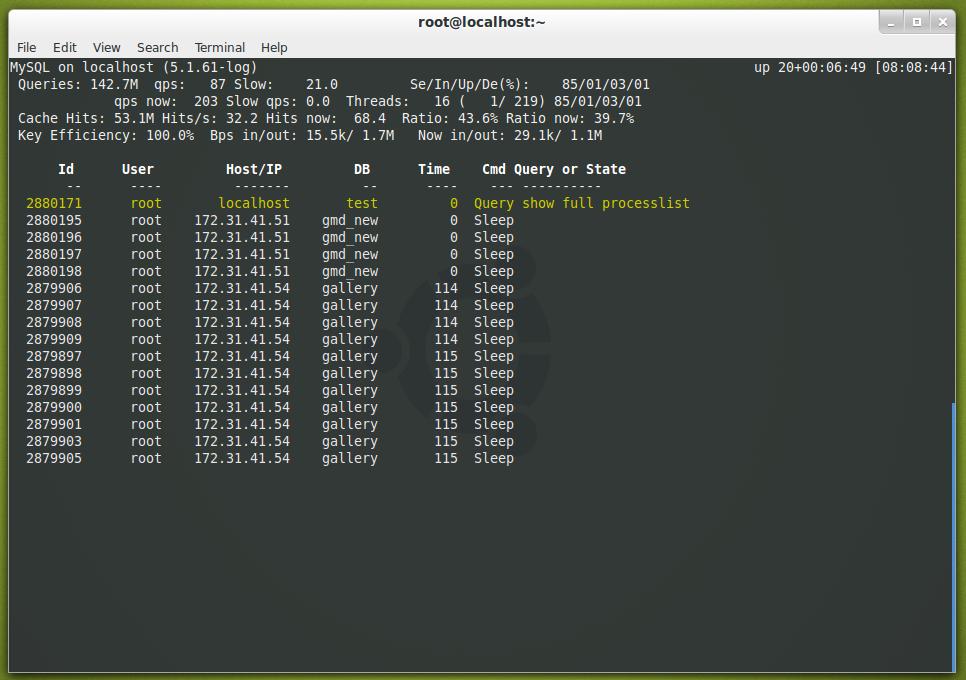
Mytop: Mysql Monitoring
There are mytop packages available for various Linux distributions, such as Ubuntu, Fedora and CentOS. For more about installation instruction read: How to Install Mytop (MySQL Monitoring) in Linux
2. Mtop
mtop (MySQL top) is a another similar open source, command line based real time MYSQL Server monitoring tool, was written in Perl language that display results in tabular format much like mytop. mtop monitors MySQL queries which are taking the most amount of time to finish and kills those long running queries after certain specified time.
In addition, it also enable us to identify performance related problems, configuration information, performance statistics and tuning related tips from the command line interface. The two tools are very similar, but mtop is not actively maintained and may not work on newly installed MySQL versions.
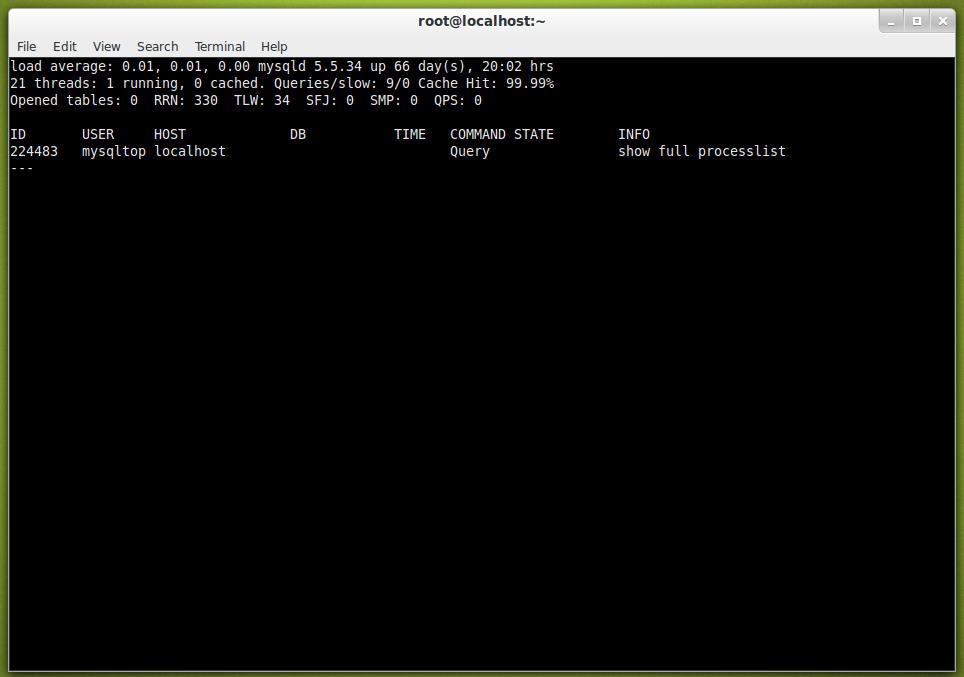
mtop Preview
For more about installation instruction read: How to Install Mtop (MySQL Monitoring) in Linux
3. Innotop
Innotop is a real time advanced command line based investigation program to monitor local and remote MySQL servers running under InnoDB engine. Innotop includes many features and comes with different types of modes/options, which helps us to monitor various aspects of MySQL performance to find out what’s wrong going with MySQL server.
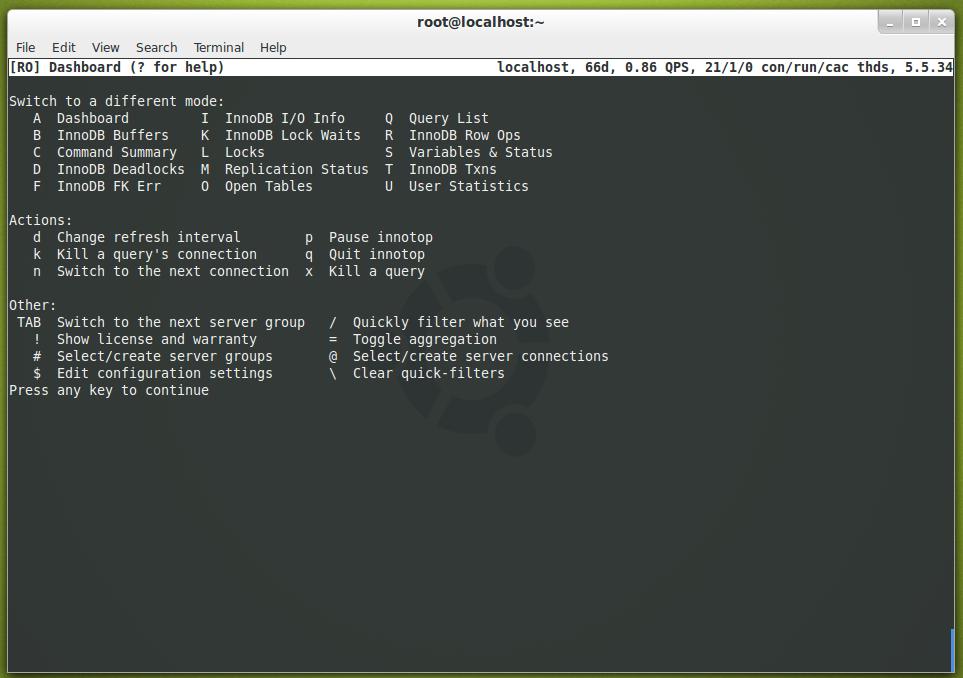
Innotop Preview
For more about installation instruction read: How to Install Innotop (MySQL Monitoring) in Linux
4. mysqladmin
mysqladmin is a default command line MySQL client that comes pre-installed with MySQL package for performing administrative operations such as monitoring processes, checking server configuration, reloading privileges, current status, setting root password, changing root password, create/drop databases, and much more.
To check the mysql status as well as uptime run the following command from the terminal, and make sure you must have root permission to execute the command from the shell.
Comments
Post a Comment